29 posts tagged with "cloud security"

View All Tags

Identify Outdated TLS Versions in Azure with StackQL

· 2 min read
Technologist and Cloud Consultant

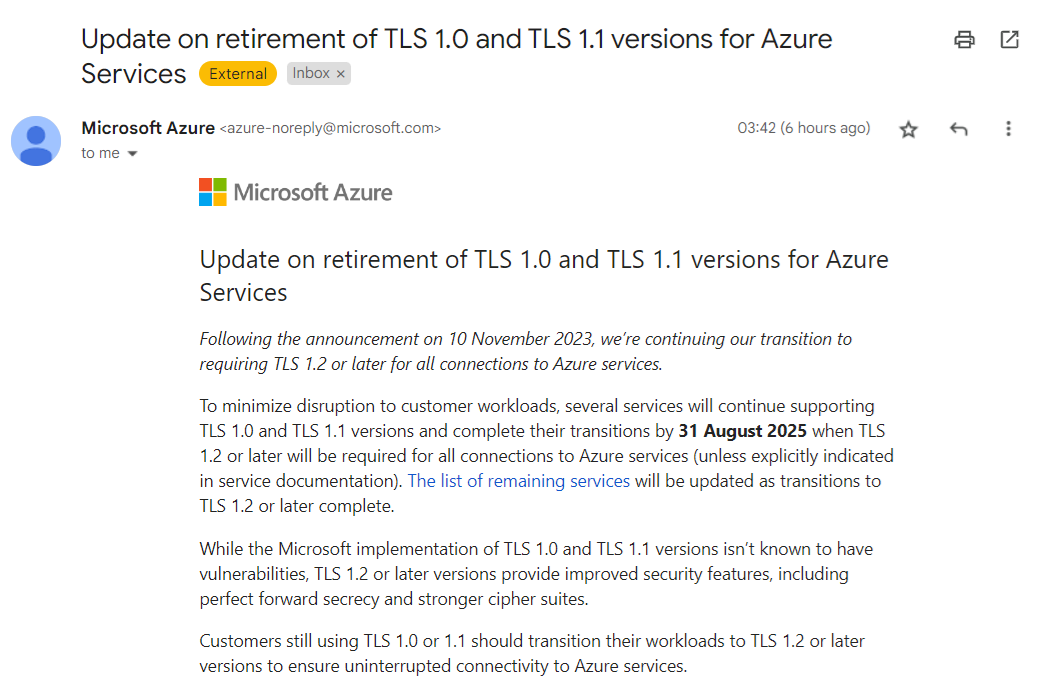
Have you received one of these?

Azure TLS Deprecation Email

Microsoft Azure is retiring TLS 1.0 and 1.1 for its services, requiring customers to transition to TLS 1.2 or later to ensure uninterrupted connectivity. If you have workloads still using older TLS versions, you’ll need to update them.

Using StackQL to Identify Non-Compliant Resources

With StackQL, you can quickly identify resources in your Azure environment that are still using older TLS versions. This article shows how to leverage StackQL queries to check various Azure services for compliance.

Prerequisites

  1. Pull the latest StackQL provider for Azure using REGISTRY PULL azure.
  2. Authenticate with Azure using StackQL by setting up your credentials as environment variables (or using your existing az login system/session authentication).

Queries to Run

Below are example queries you can use to identify resources affected by the TLS 1.2 requirement (use your subscriptionId of course):

1. Check Application Gateway Configurations

Azure Application Gateways may support older TLS versions. Run the following query to get their configurations:

SELECT
id,
name,
JSON_EXTRACT(properties, '$.sslPolicy') as ssl_policy,
JSON_EXTRACT(properties, '$.defaultPredefinedSslPolicy') as default_predefined_ssl_policy
FROM
azure.network.application_gateways
WHERE
subscription_id = '123e4567-e89b-12d3-a456-426614174000'
AND ssl_policy IS NOT NULL
AND JSON_EXTRACT(properties, '$.sslPolicy') NOT LIKE '%TLS12%';

This query lists all Application Gateways configured with TLS versions lower than 1.2.

2. Inspect App Service Configurations

If you use Azure App Services (Web Apps), check their TLS configurations with this query:

SELECT
id,
name,
JSON_EXTRACT(properties, '$.httpsOnly') as https_only,
JSON_EXTRACT(properties, '$.siteConfig.minTlsVersion') as min_tls_version
FROM
azure.web.web_apps
WHERE
subscription_id = '123e4567-e89b-12d3-a456-426614174000'
AND JSON_EXTRACT(properties, '$.siteConfig.minTlsVersion') < '1.2';

This returns all web apps that allow connections using TLS versions older than 1.2.

3. Check SQL Server Instances

Azure SQL Databases and SQL Managed Instances may also have TLS configurations that need checking:

SELECT
location,
fullyQualifiedDomainName,
minimalTlsVersion,
state
FROM
azure.sql.servers
WHERE
subscription_id = '123e4567-e89b-12d3-a456-426614174000'
AND minimalTlsVersion < '1.2';

This shows all SQL servers with a minimal TLS version set below 1.2.

We’d love to hear your feedback. ⭐ us on GitHub and let us know how StackQL helps you manage your Azure resources!
stackql-deploy Docs Site Live

· One min read
Technologist and Cloud Consultant

The stackql-deploy docs site is now available, offering a comprehensive guide to using stackql-deploy for your cloud resource deployments and tests. The site includes detailed documentation, examples, and best practices to help you get started quickly and effectively.

tip

stackql-deploy is a declarative, stateless (and state file-less) infrastructure-as-code and test framework, driven by stackql queries. stackql-deploy is capable of provisioning, updating, de-provisioning and testing cloud and SaaS stacks across all cloud and SaaS providers.

stackql-deploy-github-actions-screenshot

Let us know what you think! ⭐ us on GitHub.

Linux arm64 StackQL Binary Available

· One min read
Technologist and Cloud Consultant

StackQL is now available for ARM64-based Linux systems. To download the ARM64 binary, please visit our downloads page, where you can find the appropriate version for your system.

Let us know what you think! ⭐ us on GitHub.

GitHub Action available for stackql-deploy

· One min read
Technologist and Cloud Consultant

stackql-deploy is now available in the GitHub Actions Marketplace.

tip

stackql-deploy is a declarative, stateless (and state file-less) infrastructure-as-code and test framework, driven by stackql queries. stackql-deploy is capable of provisioning, updating, de-provisioning and testing cloud and SaaS stacks across all cloud and SaaS providers.

Given this example stackql-deploy stack definition in a GitHub repo, you would simply add the following to your GitHub Actions workflow:

...
jobs:
stackql-actions-test:
name: StackQL Actions Test
runs-on: ubuntu-latest
env:
GOOGLE_CREDENTIALS: ${{ secrets.GOOGLE_CREDENTIALS }}

steps:
- name: Checkout
uses: actions/checkout@v4

- name: Deploy a Stack
uses: stackql/setup-deploy@v1.0.1
with:
command: build
stack-dir: examples/k8s-the-hard-way
stack-env: dev
env-vars: GOOGLE_PROJECT=stackql-k8s-the-hard-way-demo

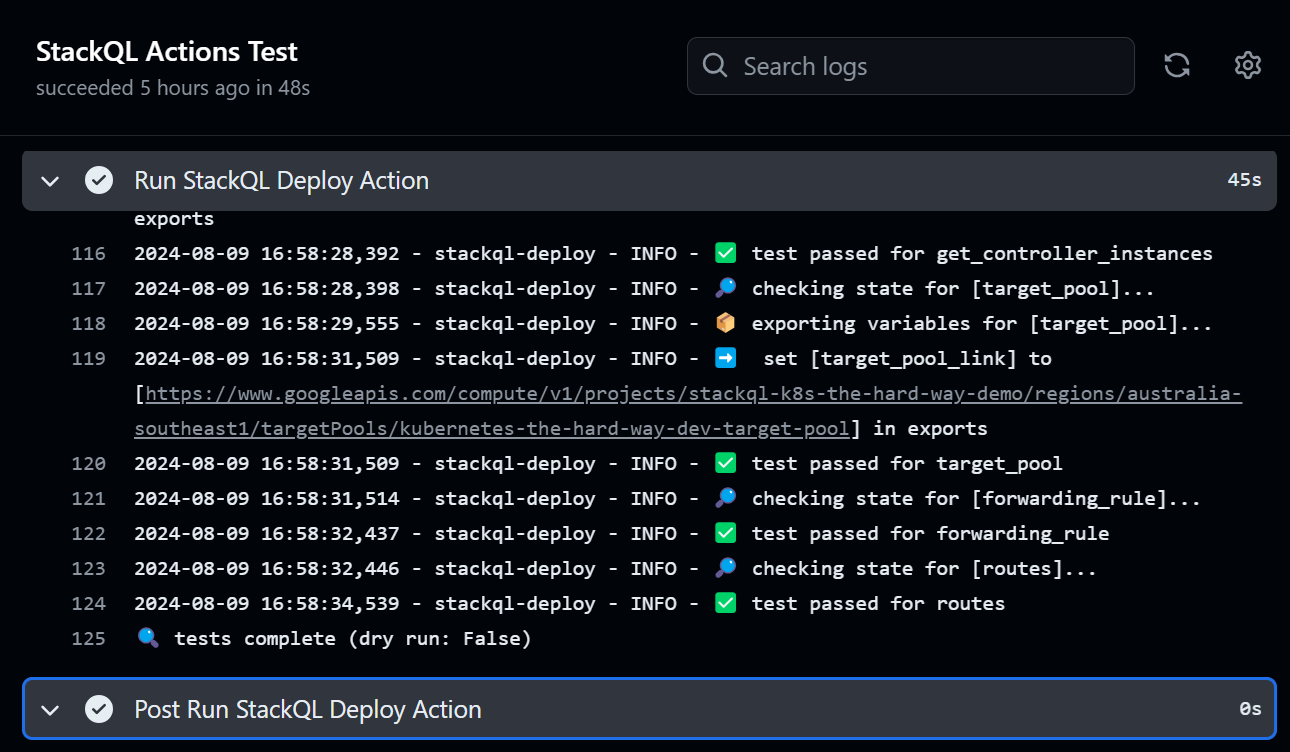
Example output is shown here:

stackql-deploy-github-actions-screenshot

Let us know what you think! ⭐ us on GitHub.

Delete Default AWS VPCs with StackQL

· 6 min read
Technologist and Cloud Consultant

AWS creates default VPCs in each region for convenience. However, these default VPCs often contain noncompliant network ACLs and security group rules that do not align with best practices for AWS Config and Security Hub. Deleting these default VPCs is beneficial, especially for regions not used by your organization or architectures that do not utilize a VPC.  

This guide demonstrates how to use StackQL to enumerate and delete all default VPCs and their associated resources in all AWS regions.  

What you need

All you need to do is to install the pystackql package using:

pip install pystackql

Deleting resources will require a privileged AWS IAM user. You can do this from a terminal with the AWS_ACCESS_KEY_ID and AWS_SECRET_ACCESS_KEY environment variables set (and optionally AWS_SESSION_TOKEN set if you are using sts assume-role).  

You can also use the StackQL Cloud Shell Scripts, from within AWS Cloud Shell, to run authenticated StackQL queries using:

sh stackql-aws-cloud-shell.sh

How it works

This example uses the awscc (AWS Cloud Control) provider. Cloud Control resources are read in two steps: a _list_only view returns the resource identifiers in a region, and the resource view returns the full properties for a single resource selected by its Identifier.

Default VPCs in AWS regions have a CIDR block of 172.31.0.0/16, before deleting anything, the program ensures it is not in use by listing the network interfaces in the region and checking whether any belong to the VPC:

SELECT id
FROM awscc.ec2.network_interfaces_list_only
WHERE region = '{region}'

If any resources are using the VPC (such as EC2, RDS, ELB/ALB, VPC attached Lambda functions, etc), it will skip these VPCs.  Once determined that the VPC is not in use, all of the resources associated with the VPC must be deleted before the VPC itself can be deleted; this includes:

  • External Routes (awscc.ec2.routes)
  • Internet Gateways (awscc.ec2.internet_gateways)
  • NACLs (awscc.ec2.network_acls)
  • Subnets (awscc.ec2.subnets)
  • and then finally, the VPC (awscc.ec2.vpcs)

The default route table and default security group are deleted automatically when deleting the VPC

This is done by discovering the resources using StackQL SELECT queries and deleting them using StackQL DELETE queries, like:

DELETE FROM awscc.ec2.network_acls
WHERE data__Identifier = '{nacl_id}'
AND region = '{region}'

Complete code

The following Python program uses StackQL to list and delete default VPCs and their associated resources (subnets, route tables, internet gateways, security groups, and network ACLs) across all AWS regions.

Get the complete code here
from pystackql import StackQL
stackql = StackQL()
stackql.executeStmt("REGISTRY PULL awscc")

def ensure_one_or_zero(resource_list, resource_name, region):
if len(resource_list) > 1:
raise RuntimeError(f"ah snap! multiple default {resource_name} resources found in {region}")
elif len(resource_list) == 0:
print(f"/* no default {resource_name} found in {region} */\n")
return False
return True

def get_resource(region, resource, identifier):
# fetch the full properties of a single Cloud Control resource by its identifier
rows = stackql.execute(f"""
SELECT *
FROM awscc.ec2.{resource}
WHERE region = '{region}'
AND Identifier = '{identifier}'
""")
return rows[0] if len(rows) else None

def find_in_vpc(region, resource, id_col, vpc_id):
# list all identifiers for a resource in a region, then keep those attached to the target VPC
matches = []
for row in stackql.execute(f"SELECT {id_col} FROM awscc.ec2.{resource}_list_only WHERE region = '{region}'"):
detail = get_resource(region, resource, row[id_col])
if detail and detail.get('vpc_id') == vpc_id:
matches.append(detail)
return matches

regions = [
'us-east-1', 'us-east-2', 'us-west-1', 'us-west-2',
'eu-central-1', 'eu-central-2', 'eu-west-1', 'eu-west-2', 'eu-west-3', 'eu-north-1', 'eu-south-1',
'ap-east-1', 'ap-south-1', 'ap-south-2', 'ap-northeast-1', 'ap-northeast-2', 'ap-northeast-3',
'ap-southeast-1', 'ap-southeast-2', 'ap-southeast-3', 'ap-southeast-4', 'af-south-1',
'ca-central-1', 'me-south-1', 'me-central-1', 'sa-east-1'
]

for region in regions:
# find the default VPC (CIDR 172.31.0.0/16, untagged) by listing VPCs then inspecting each
default_vpcs = []
for row in stackql.execute(f"SELECT vpc_id FROM awscc.ec2.vpcs_list_only WHERE region = '{region}'"):
vpc = get_resource(region, 'vpcs', row['vpc_id'])
if vpc and vpc.get('cidr_block') == '172.31.0.0/16' and not vpc.get('tags'):
default_vpcs.append(vpc)
if not ensure_one_or_zero(default_vpcs, 'VPC', region): continue
vpc_id = default_vpcs[0]['vpc_id']

# check if the VPC is in use
network_interfaces = find_in_vpc(region, 'network_interfaces', 'id', vpc_id)
if len(network_interfaces) > 0:
print(f"/* skipping deletion of default VPC ({vpc_id}) in {region} because it is in use */\n")
continue

print(f"/* deleting resources for default VPC ({vpc_id}) in {region} */\n")

# get the default route table for the VPC
route_tables = find_in_vpc(region, 'route_tables', 'route_table_id', vpc_id)
ensure_one_or_zero(route_tables, 'route table', region)
route_table_id = route_tables[0]['route_table_id']

# get the internet gateway from the default (0.0.0.0/0) route
default_route = get_resource(region, 'routes', f'{route_table_id}|0.0.0.0/0')
inet_gateway_id = default_route['gateway_id'] if default_route else None

# delete the default route
print(f"/* deleting default VPC routes in route table ({route_table_id}) in {region} */")
print(f"""
DELETE FROM awscc.ec2.routes
WHERE data__Identifier = '{route_table_id}|0.0.0.0/0'
AND region = '{region}';
""")

# detach the internet gateway
print(f"/* detaching default VPC internet gateway ({inet_gateway_id}) in {region} */")
print(f"""
DELETE FROM awscc.ec2.vpc_gateway_attachments
WHERE data__Identifier = 'IGW|{vpc_id}'
AND region = '{region}';
""")

# delete the internet gateway
print(f"/* deleting default VPC internet gateway ({inet_gateway_id}) in {region} */")
print(f"""
DELETE FROM awscc.ec2.internet_gateways
WHERE data__Identifier = '{inet_gateway_id}'
AND region = '{region}';
""")

# delete the network ACL
nacls = find_in_vpc(region, 'network_acls', 'id', vpc_id)
ensure_one_or_zero(nacls, 'network acl', region)
nacl_id = nacls[0]['id']
print(f"/* deleting default VPC NACL ({nacl_id}) in {region} */")
print(f"""
DELETE FROM awscc.ec2.network_acls
WHERE data__Identifier = '{nacl_id}'
AND region = '{region}';
""")

# delete the subnets
subnets = find_in_vpc(region, 'subnets', 'subnet_id', vpc_id)
for subnet in subnets:
print(f"/* deleting default VPC subnet ({subnet['subnet_id']}) in {region} */")
print(f"""
DELETE FROM awscc.ec2.subnets
WHERE data__Identifier = '{subnet['subnet_id']}'
AND region = '{region}';
""")

# delete the VPC
print(f"/* deleting default VPC ({vpc_id}) in {region} */")
print(f"""
DELETE FROM awscc.ec2.vpcs
WHERE data__Identifier = '{vpc_id}'
AND region = '{region}';
""")

run the program using:

python3 delete-all-default-vpcs.py > delete_default_vpcs.iql

to generate a StackQL script you can run as a batch using stackql exec or as individual statements in the stackql shell.

Conclusion

Deleting default VPCs can help improve your AWS security posture by removing potentially noncompliant network configurations. This program leverages StackQL to automate the process, ensuring consistency across all regions.

Let us know what you think! ⭐ us on GitHub.