7 posts tagged with "azure"

View All Tags

Azure Provider Update - July 2026

· 4 min read
Technologist and Cloud Consultant

We've released a major update to the StackQL Azure provider family:

  • azure - core Microsoft Azure services: 268 services, 3,473 resources and 13,559 operations (up from 202 services, a 33% increase in service coverage)
  • azure_extras - domain-specific and specialized Microsoft services (44 services)
  • azure_isv - Azure Native ISV and partner services: Databricks, Datadog, Confluent, Elastic, MongoDB Atlas, Oracle Database@Azure and more (27 services)
  • azure_stack - the Azure Stack / Azure Local family (4 services)

Service, resource and method names are consistently snake_cased, service titles carry the official Azure product names, and related services have been consolidated - SHOW SERVICES IN azure now reads like the Azure portal, not like an SDK package index.

Control plane and data plane in one provider

Most Azure tooling stops at ARM. This provider exposes Azure data plane APIs alongside the ARM control plane as first-class services, so the same SQL surface that manages a resource can work with what's inside it.

Enumerate Key Vaults in a subscription (control plane), then list the secrets in one of them (data plane):

SELECT name, location
FROM azure.key_vault.vaults
WHERE subscription_id = '<subscription_id>';

SELECT id, content_type, attributes
FROM azure.key_vault_secrets.secrets
WHERE vault_name = 'my-vault';

The same pattern extends across the platform - Storage blobs, queues and file shares, Cosmos DB tables, App Configuration key-values, Event Grid publishing, Container Registry repositories, Azure Monitor log queries and ingestion, Azure Maps, Azure AI Search documents, Service Fabric cluster operations, Batch jobs, and the Synapse and Purview workspace APIs are all present as data plane services next to their management planes.

The AI surface

The biggest expansion in this release is AI - 20 services covering Azure AI Foundry and the Azure AI services portfolio:

  • Azure AI Foundry: ai_projects, ai_agents, ai_inference, ai_evaluation
  • Language: ai_language (conversational language understanding, question answering and their authoring surfaces in a single service), ai_text_analytics, ai_translation_text, ai_translation_document
  • Vision: ai_vision_image_analysis, ai_vision_face
  • Documents: ai_document_intelligence, ai_form_recognizer
  • Speech: ai_transcription, ai_voice_live
  • Safety and content: ai_content_safety, ai_content_understanding
  • Plus ai_anomaly_detector, ai_personalizer, ai_discovery and the cognitive_services management plane

Inventory every Azure AI services account in a subscription, with kind and provisioning state:

SELECT name, kind, location, provisioning_state
FROM azure.cognitive_services.accounts
WHERE subscription_id = '<subscription_id>';

ARM's nested properties envelope is flattened at query time, so attributes like provisioning_state are ordinary columns - no JSON extraction needed for the common case.

More new and expanded coverage

  • Communication - the full Azure Communication Services surface: email, SMS, chat, calling automation, phone numbers, rooms, job router, advanced messaging and identity (9 services)
  • Databases - Azure NetApp Files, Azure Cache for Redis, Azure Managed Redis, Azure DocumentDB (MongoDB compatibility), Azure HorizonDB, MySQL and PostgreSQL flexible servers, Azure Data Explorer (Kusto)
  • Compute and containers - Compute Fleet, Compute Schedule, AKS (container_service), Kubernetes Fleet Manager, deployment safeguards, Container Registry tasks and data plane, Azure Red Hat OpenShift, Azure VMware Solution
  • Observability - Azure Monitor log query, metrics query and logs ingestion data planes, Azure Monitor workspaces (managed Prometheus), health models
  • Governance - Microsoft Purview catalog, data map, scanning, sharing and workflow APIs; a consolidated resource service spanning deployments, policy, locks, template specs and subscriptions
  • Maps - geocoding, routing, rendering, geolocation, timezone and weather (6 services)
  • Hybrid - Azure Arc-enabled servers, Kubernetes, VMware vSphere and System Center VMM, Arc gateway, Azure Local

Authentication

The provider uses Azure's standard credential chain - an az login session works as-is, or set service principal credentials:

export AZURE_TENANT_ID=<tenant_id>
export AZURE_CLIENT_ID=<client_id>
export AZURE_CLIENT_SECRET=<client_secret>

Get started

Pull the providers from the public registry:

registry pull azure
registry pull azure_extras
registry pull azure_isv
registry pull azure_stack

Then explore - it's just SQL:

SELECT name, location, provisioning_state, vm_id
FROM azure.compute.virtual_machines
WHERE subscription_id = '<subscription_id>';

Provider docs are at azure-provider.stackql.io. Let us know what you build. Star us on GitHub.
Identify Outdated TLS Versions in Azure with StackQL

· 2 min read
Technologist and Cloud Consultant

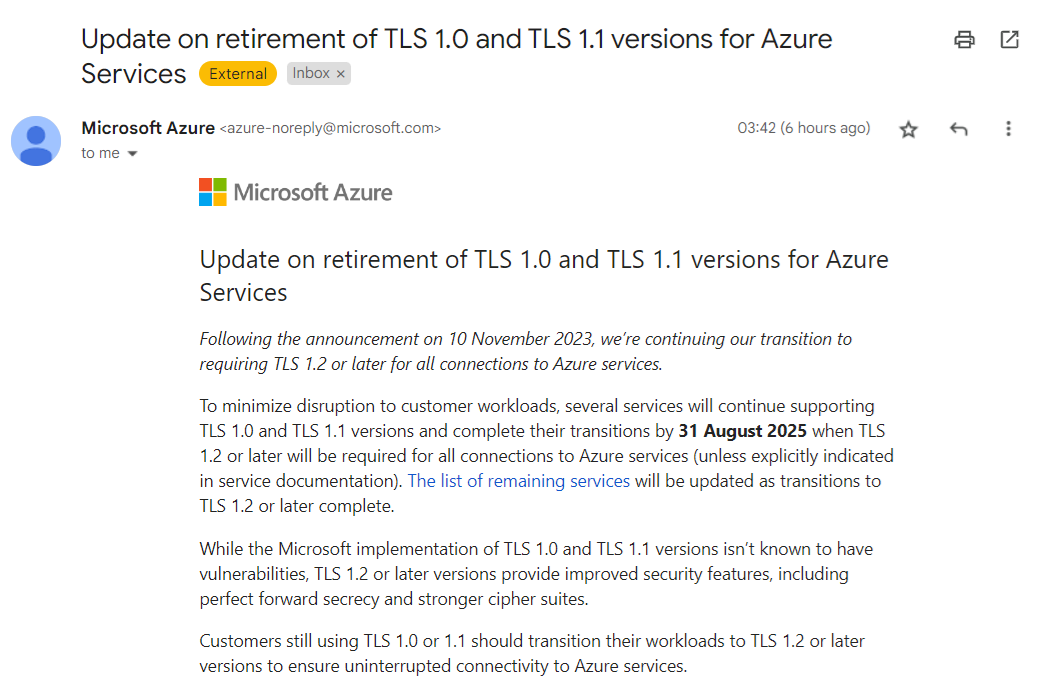
Have you received one of these?

Azure TLS Deprecation Email

Microsoft Azure is retiring TLS 1.0 and 1.1 for its services, requiring customers to transition to TLS 1.2 or later to ensure uninterrupted connectivity. If you have workloads still using older TLS versions, you’ll need to update them.

Using StackQL to Identify Non-Compliant Resources

With StackQL, you can quickly identify resources in your Azure environment that are still using older TLS versions. This article shows how to leverage StackQL queries to check various Azure services for compliance.

Prerequisites

  1. Pull the latest StackQL provider for Azure using REGISTRY PULL azure.
  2. Authenticate with Azure using StackQL by setting up your credentials as environment variables (or using your existing az login system/session authentication).

Queries to Run

Below are example queries you can use to identify resources affected by the TLS 1.2 requirement (use your subscriptionId of course):

1. Check Application Gateway Configurations

Azure Application Gateways may support older TLS versions. Run the following query to get their configurations:

SELECT
id,
name,
JSON_EXTRACT(properties, '$.sslPolicy') as ssl_policy,
JSON_EXTRACT(properties, '$.defaultPredefinedSslPolicy') as default_predefined_ssl_policy
FROM
azure.network.application_gateways
WHERE
subscription_id = '123e4567-e89b-12d3-a456-426614174000'
AND ssl_policy IS NOT NULL
AND JSON_EXTRACT(properties, '$.sslPolicy') NOT LIKE '%TLS12%';

This query lists all Application Gateways configured with TLS versions lower than 1.2.

2. Inspect App Service Configurations

If you use Azure App Services (Web Apps), check their TLS configurations with this query:

SELECT
id,
name,
JSON_EXTRACT(properties, '$.httpsOnly') as https_only,
JSON_EXTRACT(properties, '$.siteConfig.minTlsVersion') as min_tls_version
FROM
azure.web.web_apps
WHERE
subscription_id = '123e4567-e89b-12d3-a456-426614174000'
AND JSON_EXTRACT(properties, '$.siteConfig.minTlsVersion') < '1.2';

This returns all web apps that allow connections using TLS versions older than 1.2.

3. Check SQL Server Instances

Azure SQL Databases and SQL Managed Instances may also have TLS configurations that need checking:

SELECT
location,
fullyQualifiedDomainName,
minimalTlsVersion,
state
FROM
azure.sql.servers
WHERE
subscription_id = '123e4567-e89b-12d3-a456-426614174000'
AND minimalTlsVersion < '1.2';

This shows all SQL servers with a minimal TLS version set below 1.2.

We’d love to hear your feedback. ⭐ us on GitHub and let us know how StackQL helps you manage your Azure resources!

New Azure Providers Available

· One min read
Technologist and Cloud Consultant

New versions of the azure providers for stackql are available now in the stackql-provider-registry.

Summary stats for the main azure provider:

Total Services196
Total Resources4,020
Total Methods11,160

New versions of the azure_extras, azure_isv and azure_stack providers are available as well.

New services available include:

  • Microsoft Entra Verified ID
  • Database Watcher for Azure SQL
  • Azure Compute Fleet
  • Azure Edge Zones
  • Azure Standby Pools
  • Informatica Intelligent Data Management Cloud
  • MongoDB Atlas on Azure
  • Oracle Database Service for Azure
  • Split Feature Data Platform

Let us know what you think! ⭐ us on GitHub.

Using StackQL in Native Cloud Shells in AWS, Azure and GCP

· 4 min read
Technologist and Cloud Consultant

StackQL allows you to query and interact with your cloud and SaaS assets using a simple SQL framework. Use cases include CSPM, asset inventory and analysis, finops and more, as well as our IaC and ops (lifecycle management).

The three major cloud providers all offer a built-in Linux shell for executing commands using their respective CLIs; in some cases, they come with tools like terraform pre-installed. They are pre-authorized with your credentials in the cloud console for the user you authenticated with.

Now you can easily use stackql - a unified analytics and IaC dev tool - in all major cloud providers' built-in shells, using cloud shell scripts packaged with the stackql Linux binary (available from v0.5.587 onwards).

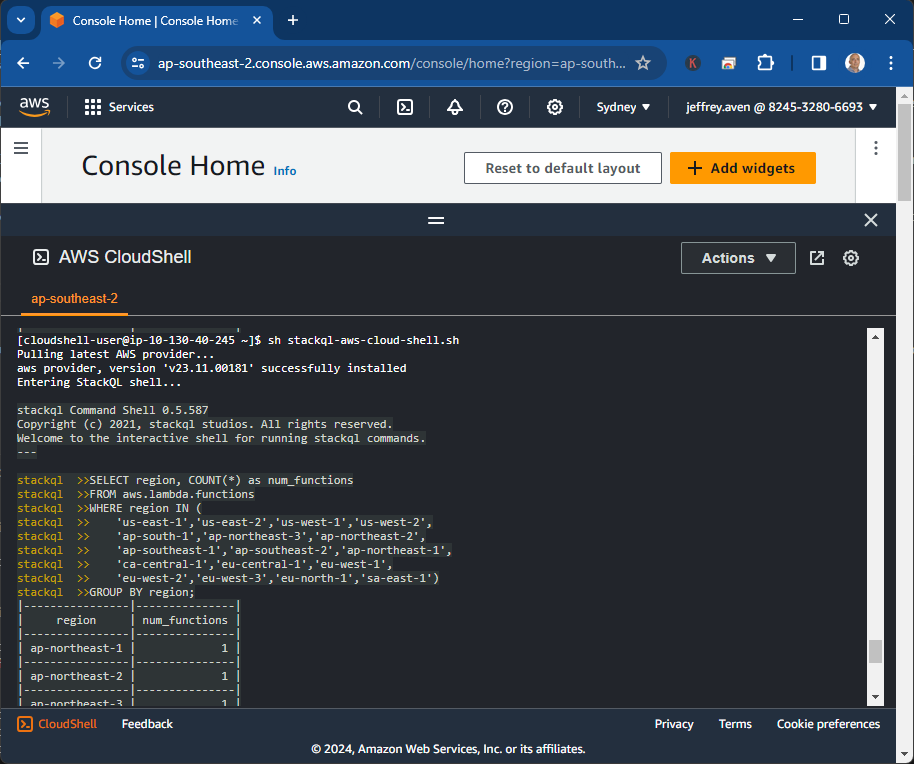
StackQL is particularly useful for asynchronously querying across regions in AWS, projects in Google, or resource groups in Azure, which is challenging to do via the CLIs. For example:

SELECT region, COUNT(*) as num_functions
FROM aws.lambda.functions
WHERE region IN (
'us-east-1','us-east-2','us-west-1','us-west-2',
'ap-south-1','ap-northeast-3','ap-northeast-2',
'ap-southeast-1','ap-southeast-2','ap-northeast-1',
'ca-central-1','eu-central-1','eu-west-1',
'eu-west-2','eu-west-3','eu-north-1','sa-east-1')
GROUP BY region;

Additionally, you could authenticate to another provider from one cloud shell simultaneously and run multi-cloud inventory commands. For example:

SELECT
name,
SPLIT_PART(machineType, '/', -1) as instance_type,
'google' as provider
FROM google.compute.instances
WHERE project IN ('myproject1','myproject2')
UNION
SELECT
instanceId as name,
instanceType as instance_type,
'aws' as provider
FROM aws.ec2.instances
WHERE region IN (
'us-east-1','us-east-2','us-west-1','us-west-2',
'ap-south-1','ap-northeast-3','ap-northeast-2',
'ap-southeast-1','ap-southeast-2','ap-northeast-1',
'ca-central-1','eu-central-1','eu-west-1',
'eu-west-2','eu-west-3','eu-north-1','sa-east-1');

Getting Started

To get started with StackQL in your preferred cloud shell environment, download the StackQL package using the following command:

curl -L https://bit.ly/stackql-zip -O \
&& unzip stackql-zip

This command downloads the StackQL package, unzips it, and sets the appropriate permissions. From there, you can use our tailored scripts for AWS, Google Cloud, or Azure to integrate StackQL seamlessly into your cloud shell environment.

Using StackQL in the AWS Cloud Shell

Run the stackql-aws-cloud-shell.sh as follows to use the StackQL command shell within the AWS cloud shell:

sh stackql-aws-cloud-shell.sh

An example is shown here:

aws-cloud-shell-example

You can also run stackql exec commands using the stackql-aws-cloud-shell.sh script; for instance, this command will write a CSV file for the results of a query that could be downloaded from the Cloud Shell.

sh stackql-aws-cloud-shell.sh exec \
--output csv --outfile instances.csv \
"SELECT region, instanceType FROM aws.ec2.instances WHERE region IN ('us-east-1')"

Additionally, you can supply an IAM role using the --role-arn argument to assume another role for your query or mutation operation, an example is shown here:

sh stackql-aws-cloud-shell.sh \
--role-arn arn:aws:iam::824532806693:role/SecurityReviewerRole exec \
--infile query.iql \
--output csv --outfile output.csv

Using StackQL in the Azure Cloud Shell

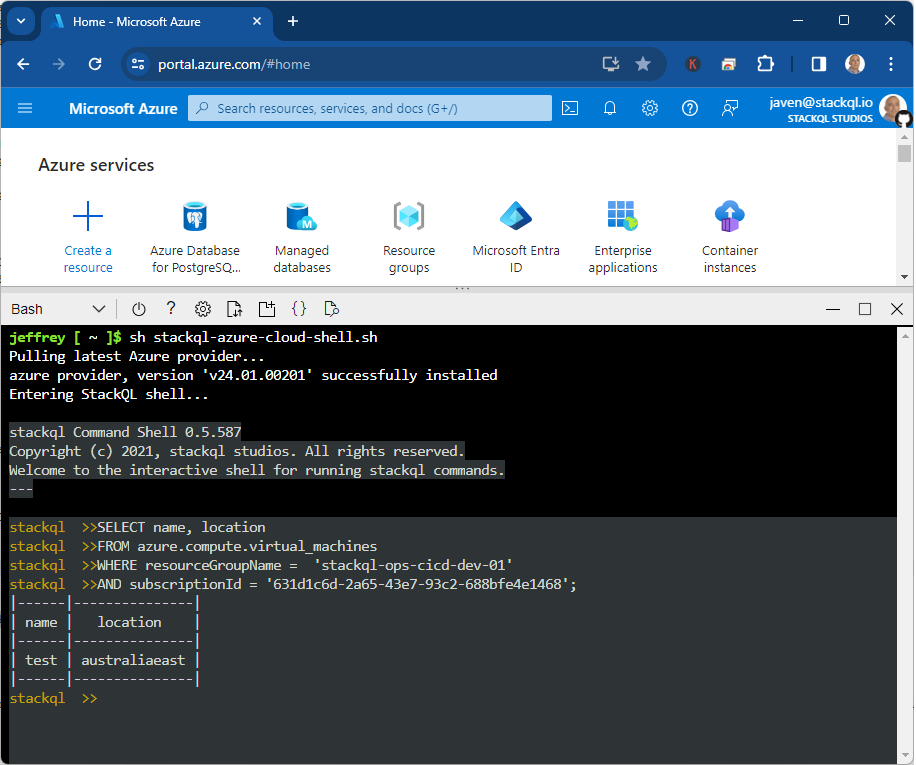
Run the stackql-azure-cloud-shell.sh as follows to open a StackQL command shell from the Azure Cloud Shell:

sh stackql-azure-cloud-shell.sh

An example is shown here:

azure-cloud-shell-example

Similar to the AWS script, you can also invoke stackql exec as well, an example is shown here:

sh stackql-azure-cloud-shell.sh exec \
--output csv --outfile instances_by_location.csv \
"SELECT location, COUNT(*) as num_instances FROM azure.compute.virtual_machines WHERE resource_group_name = 'stackql-ops-cicd-dev-01' AND subscription_id = '631d1c6d-2a65-43e7-93c2-688bfe4e1468' GROUP BY location"

Using StackQL in the Google Cloud Shell

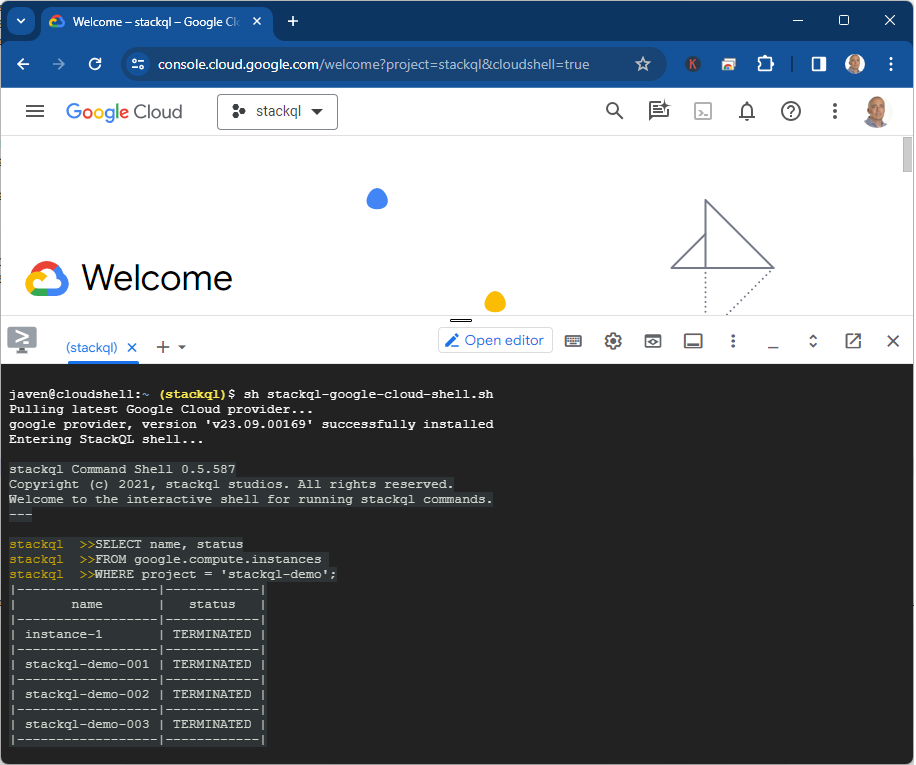
Run the stackql-google-cloud-shell.sh as shown below to launch a StackQL command shell from within the google cloud shell:

sh stackql-google-cloud-shell.sh

An example is shown here:

google-cloud-shell-example

As with the other two providers, you can run exec commands following the example below:

sh stackql-google-cloud-shell.sh exec \
--output csv --outfile instances.csv \
"SELECT name, status FROM google.compute.instances WHERE project = 'stackql-demo'"

Please give us your feedback! Star us at github.com/stackql.

New Azure Providers for StackQL Available

· One min read
Technologist and Cloud Consultant

StackQL allows you to query and interact with your cloud and SaaS assets using a simple SQL framework. Use cases include CSPM, asset inventory and analysis, finops and more, as well as our IaC and ops (lifecycle management).

Excited to announce the general availability of the latest StackQL providers for Azure. Includes expanded resource and method coverage including all of the latest Resource Manager services. The StackQL Azure provider catalog now includes:

  • azure - core Azure RM services
  • azure_extras - additional Azure services
  • azure_isv - Azure Native ISV software and services (like Databricks, Datadog, Confluent, Astro and more)
  • azure_stack - Azure Hybrid app framework

by the numbers...

ProviderTotal ServicesTotal MethodsTotal Resources
azure195138413920
azure_extras381164339
azure_isv20906253
azure18470142

More Data Plane services like Azure Container Registry coming as well, stay tuned!